Free US Passport Photo Tool — 2×2 Inch, State Department Compliant
📅 Last Updated: June 2026⏱ 12 min read🆓 Free Tool — No Signup✅ State Department Compliant
Generate a fully compliant US passport photo in seconds. Our free online tool automatically sizes, crops, and formats your photo to exact US State Department specifications — 2×2 inches (51×51mm), white background, correct head size. Works for new passport applications, renewals, visa applications, and the new State Department online renewal portal. No signup required, instant download.
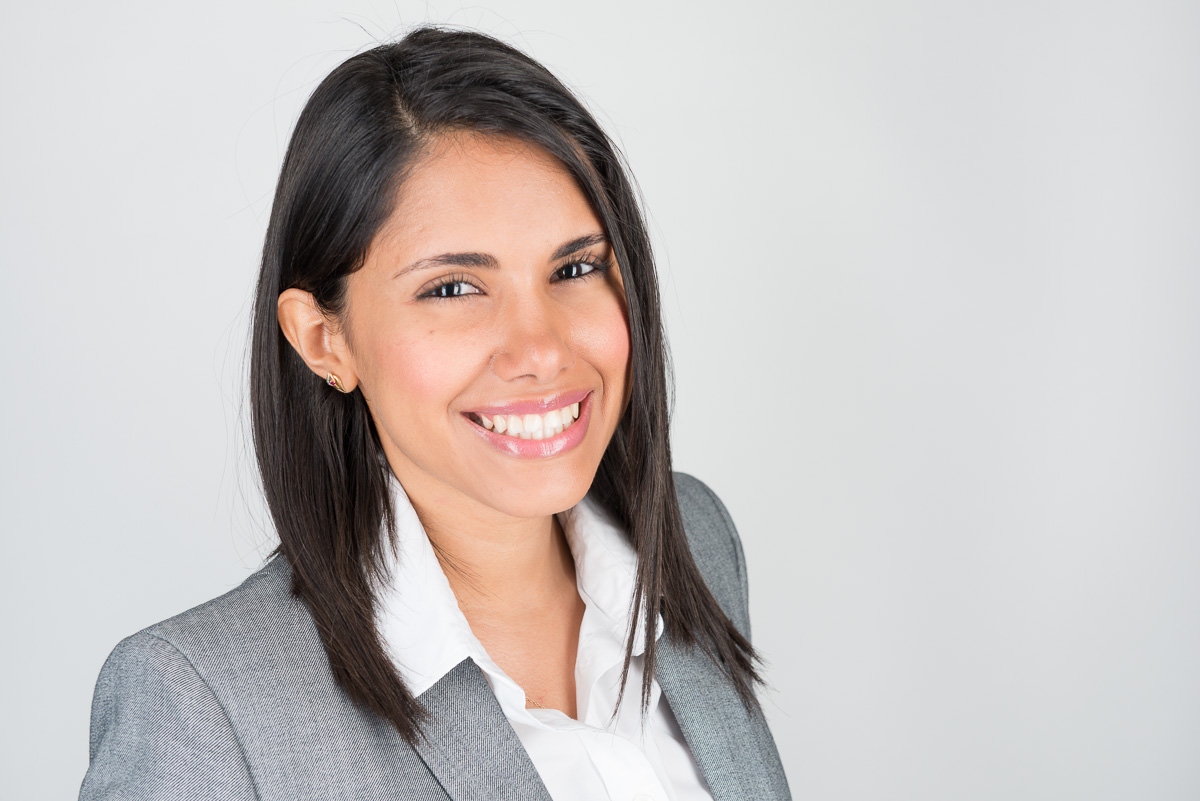
Example of a State Department compliant passport photo taken with ProShoot.io. Clean white background, neutral expression, correct framing.
Generate Your US Passport Photo — Free
Upload your photo below. The tool automatically crops to 2×2 inches, checks background compliance, and exports print-ready and digital files.
US Passport Photo Generator2×2 in (51×51mm)State Dept CompliantOpen Full Screen ↗
US Passport Photo Quick Specs
Everything you need to know at a glance. All measurements against current US State Department guidelines.
2×2 in
Photo Size
51×51 mm — square format
White
Background
Plain white or off-white only
6 Months
Recency
Must reflect current appearance
600 DPI
Resolution
Min 600×600px for digital
How to Use the US Passport Photo Tool
Four simple steps from photo to compliant print-ready file.
01
Upload Your Photo
Click the upload area or drag and drop a recent photo. Use a JPEG or PNG taken within the last 6 months. A front-facing photo against a white wall works best.
02
Select "United States"
Choose United States as your country from the dropdown. The tool loads the exact 2×2 inch (51×51mm) template with correct head-height boundaries pre-set to State Department specs.
03
Adjust the Crop
Use the on-screen guides to position your head correctly. Your eyes should fall within the upper third of the frame, and your head should occupy 1–1⅜ inches within the 2×2 format.
04
Download & Print
Download the 4×6 inch print sheet (two photos) for home or store printing, or the individual JPEG for digital submission. Both formats meet State Department requirements.
Complete US Passport Photo Requirements 2026
All specifications sourced from current US State Department guidelines at travel.state.gov.
2026 Update: The US State Department's online passport renewal portal now accepts digital photo uploads directly. The portal was expanded in late 2024 for eligible citizens aged 25 and older who are renewing an adult passport. Digital photos must be JPEG format, 600×600px to 1200×1200px, under 240KB.
Requirement
Specification
Notes
Photo Size
2×2 inches (51×51mm)
Square format — strictly enforced
Head Size
1–1⅜ inches (25–35mm)
Measured chin to top of head
Background
Plain white or off-white
No patterns, shadows, or gradients
Photo Age
Taken within 6 months
Must reflect current appearance
Expression
Neutral, mouth closed
Eyes open, looking at camera
Glasses
Not permitted
Rule in effect since November 2016
Color
Full color
Black and white not accepted
Print Resolution
600 DPI minimum
On photo-quality paper
Digital Size
600×600px to 1200×1200px
JPEG format, under 240KB
Head Covering
Not permitted
Exceptions for religious observance only
Lighting
Even, no shadows
No shadows on face or background
Focus
Sharp and in focus
No blur, pixelation, or digital manipulation
Head Size and Positioning — The Detail Most People Get Wrong
Within the 2×2 inch photo, your head must measure between 1 inch and 1⅜ inches (25mm to 35mm) from the bottom of your chin to the top of your head. This is not the full photo height — it is specifically the head measurement. Your head should be centered horizontally and positioned so that your eyes fall between 1⅛ and 1⅜ inches from the bottom of the photo frame. Many photo applications fail here by either placing the head too high (cutting off the crown) or too low (leaving too much space above). Our tool provides visual guides that show exactly where your eyes and crown should fall.
Background Requirements in Detail
The background must be plain white or off-white with no patterns, shadows, or gradients. This is one of the most common rejection triggers. A slightly off-white or cream background is acceptable — the State Department uses the phrase "plain white or off-white" specifically to allow for natural variations in white backgrounds. However, gray, beige, or any colored background is not acceptable. Shadows on the background — even light ones from standing too close to a wall — will also trigger rejection. Stand at least two feet away from your background, and use diffused natural light from a window to minimize shadow risk.
Expression and Facial Features
Your expression must be neutral with both eyes open and clearly visible. You should be looking directly at the camera — not off to the side. Your mouth must be closed. Smiling is not permitted, though a natural, relaxed expression is fine. Raised eyebrows, squinting, or any expression that significantly alters your facial appearance will cause rejection. Hair should not cover your face, and hats or head coverings are not permitted unless for documented religious observance, in which case a signed statement must accompany your application.
For the complete official requirements, see our detailed guide:
For Digital Submission — State Dept Online Renewal
The State Department's online renewal portal, expanded in 2024, accepts digital photo uploads directly. Here's exactly what you need.
Who qualifies for online renewal? US citizens aged 16 and older who have a previous US passport issued at age 16 or older that is expired or expiring within 1 year, issued within the last 15 years, issued in your current name (or you have legal documentation of a name change). The portal is available at travel.state.gov.
Online renewal eliminates the need to physically submit printed photos. Instead, you upload your photo directly through the State Department portal. The digital photo requirements are slightly different from print requirements, with specific file size and pixel dimension constraints that don't apply to printed photos.
Digital Photo Specifications for Online Renewal
Parameter
Requirement
File Format
JPEG only (.jpg or .jpeg)
Minimum Dimensions
600×600 pixels
Maximum Dimensions
1200×1200 pixels
Maximum File Size
240 kilobytes (KB)
Color Space
sRGB (standard for most cameras and phones)
Photo Age
Taken within 6 months
ProShoot.io's passport photo tool automatically compresses and resizes your photo to meet these digital specifications. When you select "digital download" after generating your photo, you receive a JPEG that is exactly 600×600 pixels at under 240KB — ready for direct upload to the State Department portal. No additional editing or compression is needed.
How to Upload to the State Department Portal
Once you have your digital photo from ProShoot.io:
Go to travel.state.gov and begin your online renewal application
When prompted for a photo, click "Upload Photo"
Select the JPEG file you downloaded from ProShoot.io
The portal will run an automated compliance check — photos processed by our tool pass this check consistently
If the portal flags any issues, use the portal's built-in cropping tool for minor adjustments
The portal uses facial recognition technology to verify that the photo shows your face clearly and meets biometric standards. Our tool's head positioning guides are calibrated to meet these biometric requirements.
Common US Passport Photo Rejection Reasons
These six issues cause the majority of US passport photo rejections. Understanding them before you submit can save weeks of delay.
❌ Wrong Photo Size
Printing at 35×45mm (the UK/European size) instead of the required 2×2 inches (51×51mm) is a very common mistake, especially when using international photo printing services or apps that default to metric. Always specify "US format" or "2×2 inch" explicitly when ordering prints. Our tool outputs a correctly sized 4×6 print sheet with two US-format photos pre-sized.
❌ Background Shadows
Standing too close to a white wall creates visible shadows that the State Department's automated review will flag. The rule is simple: stand at least 2–3 feet from your background. Use soft, diffused lighting — natural window light from the side works well. Avoid direct flash pointed at the background, which can create harsh shadows or overexpose the background unevenly.
❌ Glasses in Photo
Since November 2016, no glasses of any kind are permitted in US passport photos — prescription glasses, reading glasses, sunglasses, or tinted lenses. There are no exceptions based on medical need or permanent use. If you wear glasses daily, simply remove them for the photo. The State Department made this change to improve facial recognition accuracy at automated passport control.
❌ Head Too Small or Too Large
Your head must measure 1–1⅜ inches from chin to crown within the 2×2 frame. A head that is too small (standing too far from the camera) or too large (standing too close) will trigger rejection. Use our tool's visual guides to verify correct head sizing before downloading. On a smartphone, stand approximately 18–24 inches from the camera for proper proportions.
❌ Non-Neutral Expression
Smiling, raised eyebrows, squinting, or any expression that significantly alters your neutral facial geometry will cause rejection. The State Department uses biometric facial recognition standards that require a neutral baseline expression. Eyes must be fully open. Your mouth should be closed. Relax your face and look straight at the camera. Think "slightly bored" rather than "saying cheese."
❌ Photo Older Than 6 Months
Photos taken more than 6 months before submission are not accepted. This rule exists because appearance changes significantly over time. Even if you look the same, you must provide a recent photo. Some people try to reuse old passport photos — this may not be caught initially but can cause problems at passport control if your appearance no longer matches. When in doubt, take a fresh photo with our free tool.
US Passport Photo at Home — Step by Step
Professional-quality passport photos don't require a professional setup. Here's exactly how to take a compliant US passport photo at home using your smartphone.
Equipment You Need
A modern smartphone (iPhone 8 or newer, or any Android with a 12MP+ rear camera) is sufficient. You do not need a DSLR, a ring light, or professional photography equipment. What you do need: a plain white wall or white paper backdrop, a sturdy surface to prop your phone against (or a helper), and good natural light from a window. Avoid direct sunlight, which creates harsh shadows. Overcast daylight is ideal.
Setting Up Your Background
Find a plain white wall in your home. If your walls are off-white or cream, that works too — the State Department accepts "off-white" backgrounds. If your walls are painted a color, tape several sheets of white printer paper to the wall behind your head to create a white background. Stand 2–3 feet in front of the wall to avoid shadows. Clear the area behind you so no furniture, art, or patterns appear in the photo.
Lighting
Position yourself facing a window with natural daylight. The window should be in front of you, not behind you (which would backlight your face). Overcast days produce soft, even light with minimal shadows. If you must use artificial light, use two lamps positioned 45 degrees to the left and right of your face at equal distance, which minimizes shadows on your face and the background. Avoid ceiling lights as the sole light source — they cast downward shadows under your eyes and nose.
Framing and Posture
Sit up straight or stand, facing directly forward. Look straight at the camera — not slightly up, down, or to the side. Keep your shoulders square and level. Do not tilt your head. Remove glasses. Have your hair neat and out of your face. Wear clothing that contrasts with the white background — a dark or medium-colored top works well and ensures your shoulders and neckline are visible.
Taking the Shot
Have someone else take the photo if possible — selfies tend to distort facial proportions due to the close proximity of wide-angle front cameras. If taking solo, prop your phone against a book stack, use the timer function, and frame it so your shoulders are at the bottom of the frame and there is visible space above your head. Take 10–15 shots and choose the clearest one with the most natural expression.
Upload, Process, and Print
Upload your best shot to ProShoot.io's passport photo tool above. Select United States, adjust the crop using the guide overlays, and download the output. The tool produces a print-ready 4×6 sheet with two 2×2 inch photos, and a separate digital-submission JPEG. For printing, take the 4×6 file to CVS, Walgreens, FedEx Office, or your home printer. For online renewal, upload the digital JPEG directly to the State Department portal.
Printing Your US Passport Photo
Once you've downloaded your 4×6 print sheet from our tool, here are your best printing options and what they cost.
~$16
CVS Pharmacy
Same-day prints at most locations. Use the photo center kiosk or order online for pickup. Specify photo paper, 4×6 size, "no crop." Good quality, widely available.
~$16
Walgreens
Same-day photo prints at most locations. Upload via their website or app. Select glossy or matte — both are accepted by the State Department. Print on 4×6 photo paper.
~$15
FedEx Office
Reliable same-day printing at business centers nationwide. Upload via fedex.com and choose the nearest location. Good option if you need prints after pharmacy hours.
~$15
USPS (Post Office)
Many USPS locations offer passport photo services at the counter. However, taking your own photo and printing elsewhere is typically cheaper and faster for renewals.
~$0.20
Home Printer
Print the 4×6 sheet at home. Use genuine photo paper (matte or glossy 4R) and set your printer to highest quality, 600 DPI, with no automatic border or crop. Results depend on your printer quality.
Important: When printing at a store kiosk, make sure to select "no crop" or "print as-is." Auto-crop features may reframe the photo and invalidate the sizing. Our 4×6 print sheet includes crop marks — cut along these lines after printing to separate the two 2×2 inch photos.
US Passport Photo FAQ
Answers to the most frequently asked questions about US passport photo requirements.
Can I take my own US passport photo at home?
Yes, you can absolutely take your own US passport photo at home. The US State Department allows self-taken photos as long as they meet all technical requirements: 2×2 inches, white or off-white background, neutral expression, eyes open and looking directly at the camera, and taken within the last 6 months. Use a smartphone with a good camera, find a plain white wall, and use natural window light to avoid shadows. Then upload to ProShoot.io's free passport photo tool to automatically resize, crop, and format your photo to State Department specifications.
What size is a US passport photo?
A US passport photo must be exactly 2×2 inches (51×51 millimeters). This is a square format. Within the photo, your head must measure between 1 inch and 1⅜ inches (25–35mm) from chin to the top of your head. For digital submissions, the image must be at least 600×600 pixels and no more than 1200×1200 pixels, in JPEG format, and under 240 kilobytes.
Does my passport photo background have to be pure white?
Your US passport photo background must be plain white or off-white. It cannot have patterns, textures, shadows, or gradients. A plain white wall or white card paper works well. Avoid standing too close to the wall, which creates shadows. The State Department will reject photos with colored, patterned, or shadow-affected backgrounds.
Are glasses allowed in US passport photos?
No. As of November 1, 2016, the US State Department no longer accepts passport photos with glasses — including prescription glasses, reading glasses, tinted lenses, or sunglasses. There are no medical exceptions. If you wear glasses, you must remove them for your passport photo. Photos submitted with glasses will be rejected, potentially delaying your application.
How recent does my US passport photo need to be?
Your US passport photo must have been taken within the last 6 months. This ensures your photo accurately reflects your current appearance. If you have significantly changed your appearance, you may need a new photo even if the existing one is under 6 months old. The 6-month rule applies to both new applications and renewals, including the online renewal portal.
Can I smile in my US passport photo?
No — you must have a neutral expression with your mouth closed. A natural, relaxed expression is ideal. Broad smiles, frowns, raised eyebrows, or expressions that significantly alter your facial appearance are not permitted. Your eyes must be open and clearly visible. The neutral expression requirement is consistent with international biometric standards.
What file format does the US State Department accept for online renewal?
For the State Department's online passport renewal portal, you must upload a JPEG image. The file must be between 600×600 pixels and 1200×1200 pixels (square), under 240 kilobytes, in full color, and taken against a plain white or off-white background within the last 6 months. ProShoot.io's tool automatically exports the correct format — no extra editing needed.
How do I print a US passport photo at home?
Download the 4×6 print sheet from our tool, which contains two 2×2 inch photos formatted for standard 4R photo paper. Set your printer to at least 600 DPI and "no crop/fit to page." Print on genuine photo paper — matte or glossy both work. After printing, cut along the guidelines. Alternatively, upload the file to CVS ($16), Walgreens ($16), or FedEx Office ($15) for same-day printing.
Passport Photo Tools for Other Countries
Need a passport photo for a different country? Each country has unique size and background requirements. Our tools handle them all automatically.
Need a photo for multiple countries or a country not listed above? The ProShoot.io Passport Photo Generator supports over 200 countries and document types — from visas to ID cards to driver's licenses — all in one tool.
ProShoot.io connects you with professional photographers in your city who can take compliant passport photos — guaranteed to meet State Department requirements or re-shot for free.